That’s what this one tries to fix. Every phase below comes with a rough number of hours, one small project that proves you’ve learned it, and a short self-test. If you can pass the test, move on. If you can’t, you’re not behind. You just aren’t finished yet.
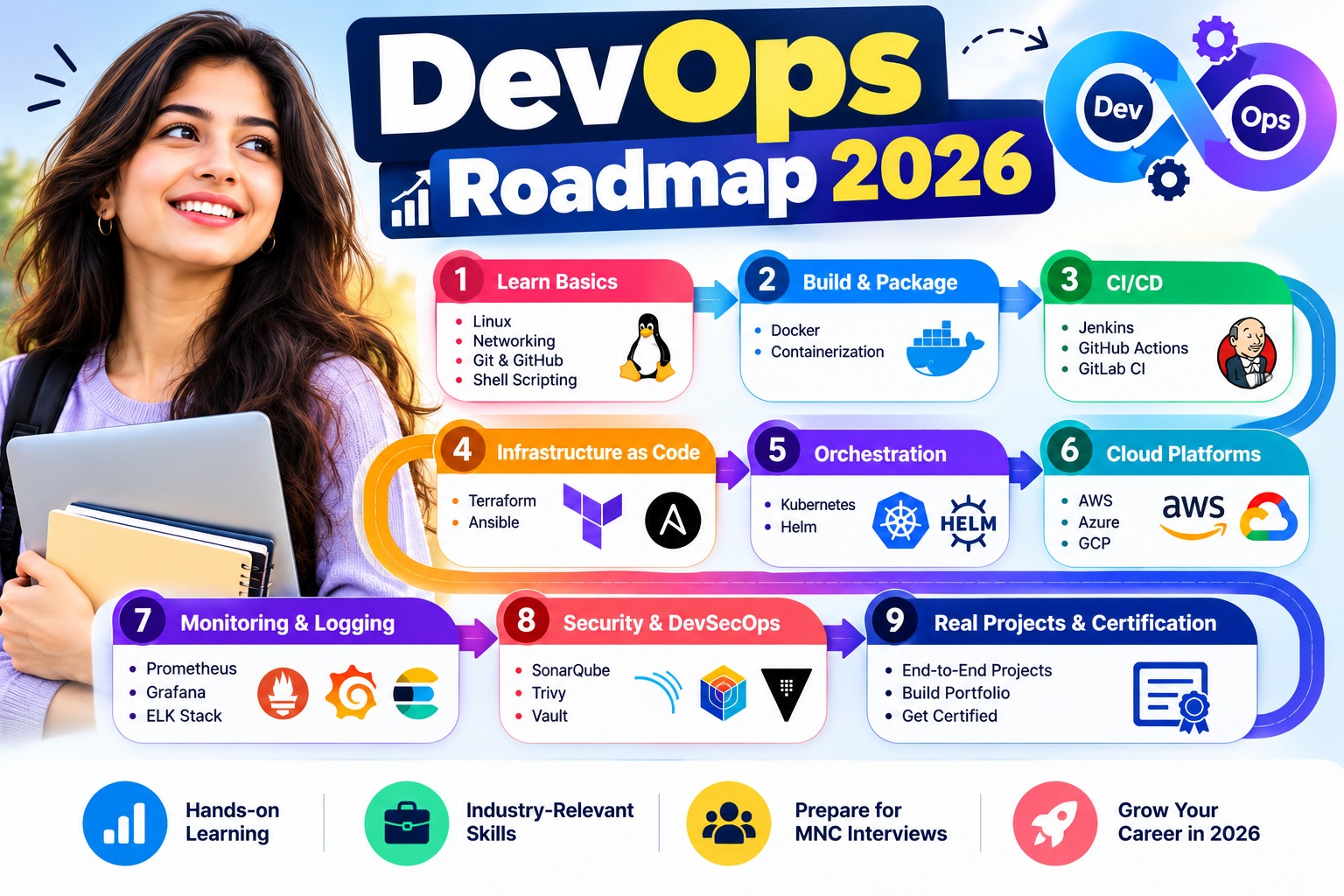
01 · The DevOps Roadmap in Short
Learn DevOps in this order: Linux, networking and Bash first, then Git, then cloud basics on AWS, then Docker, CI/CD, Terraform and Ansible, then Kubernetes, then monitoring, and finally security, GitOps and AI tools. For most beginners it takes 365 to 470 hours of focused work.
The order matters more than people think. Each step leans on the one before it. Try Kubernetes before you’re comfortable with containers and Linux and you’ll spend most of your time confused about things that have nothing to do with Kubernetes. Try Terraform before you understand what a VPC is and you’ll be writing code for infrastructure you can’t picture.
If you’re completely new and still unsure what DevOps engineers do all day, read our beginner’s guide to DevOps first. Come back once that makes sense. This roadmap assumes you know why you want to do this, and focuses on how.
02 · The Roadmap at a Glance: Phases, Hours and Checkpoints
Here’s the whole thing on one screen. The hours are estimates for someone starting from zero, doing hands-on practice rather than just watching videos. If you already work in IT, you’ll move faster through the first three phases.
| Phase | What you learn | Rough hours | What you’ll have built |
|---|---|---|---|
| 1 | Linux, networking, Bash | 60–80 | A set of shell scripts that automate real chores |
| 2 | Git and GitHub | 15–20 | A clean repo with branches, pull requests and a README |
| 3 | Cloud basics on AWS | 50–60 | A web server in a VPC you designed yourself |
| 4 | Docker | 30–40 | A two-service app that starts with one command |
| 5 | CI/CD | 40–50 | A pipeline that tests and ships on every push |
| 6 | Terraform and Ansible | 40–50 | Your Phase 3 setup, rebuilt entirely from code |
| 7 | Kubernetes | 70–90 | An app running on a cluster, deployed with Helm |
| 8 | Monitoring and observability | 30–40 | Dashboards and an alert that really fires |
| 9 | DevSecOps, GitOps, AI tools | 30–40 | A pipeline that blocks bad images and deploys through Git |
So what does that mean in months? It depends almost entirely on how many hours you can give each week.
| Hours per week | Roughly how long |
|---|---|
| 8 (busy job, some weekends) | 11 to 14 months |
| 12 (steady evenings and weekends) | 7 to 10 months |
| 20 (between jobs, or very committed) | 4.5 to 6 months |
Be honest with yourself when you pick a row. Most people overestimate the time they’ll have. It’s much better to plan for 8 hours and do 10 than plan for 20 and quietly give up in month two.
03 · Phase 1: Linux, Networking and Bash (≈ 60–80 hours)
Why this comes now
Pretty much everything in DevOps sits on Linux. Containers? Linux processes with walls around them. Cloud servers? Linux. Your pipelines? Running Linux commands. If a black terminal window still makes you a bit nervous, that’s fine, but sort it out now, because every later phase leans on it.
What to learn
Get comfortable moving around the file system, reading and changing permissions, managing processes and services with systemd, installing packages, and reading logs. Learn enough vim or nano to edit a config file over SSH without panicking.
For networking, you need the practical version, not the textbook. What an IP address and a subnet are. How DNS turns a name into an address. What happens on ports 22, 80 and 443. Why HTTPS needs a certificate. How SSH keys work.
Then Bash scripting: variables, loops, conditions, exit codes, and cron for scheduling. Python is useful later, but don’t let it delay you here. Bash gets you further, faster, in this phase.
The best free practice we know of is OverTheWire’s Bandit wargame. It’s a series of small puzzles you solve over SSH, and it teaches more Linux in a few weekends than most video courses.
Proof-of-skill checkpoint
Build this: three small scripts you’d actually use. One that backs up a folder and deletes backups older than seven days, run by cron. One that checks whether a website is up and logs the result. One that reports disk usage and warns you when it crosses 80%.
You’re ready to move on when you can: log into a fresh Linux box with an SSH key (no password prompt). Talk someone through what happens between typing a URL and the page showing up, without looking anything up. And when a service refuses to start, you go straight to its logs instead of Googling the error first.
Common trap: trying to memorise every command. You don’t need to. You need to know what’s possible and how to look it up quickly.
04 · Phase 2: Git and GitHub (≈ 15–20 hours)
Why this comes now
From here on, everything you build should live in Git. Your pipelines will be triggered by it, your infrastructure will be stored in it, and later, with GitOps, Git becomes the thing that decides what runs in production.
What to learn
The daily basics: init, add, commit, push, pull. Then branching and merging, resolving a merge conflict without fear, and opening a pull request on GitHub. Learn to write commit messages a stranger could understand.
You’ll hear about GitFlow and trunk-based development. Short version: GitFlow uses long-lived branches for features and releases. Trunk-based keeps branches short and merges into main often. Most modern teams lean towards trunk-based. Know both exist, use simple short branches yourself, and don’t lose a week over it.
Proof-of-skill checkpoint
Build this: put your Phase 1 scripts in a public GitHub repo with a proper README. Make at least one change through a branch and a pull request, even if you approve it yourself.
You’re ready to move on when you can: see a merge conflict and not feel your stomach drop. You also know how to undo a bad commit that’s already pushed, and you could explain git fetch vs git pull in one breath.
Common trap: using Git only through a GUI. Learn the commands. You’ll need them inside pipelines and on servers where there’s no GUI at all.
05 · Phase 3: Cloud Fundamentals on AWS (≈ 50–60 hours)
Why this comes now
Docker, CI/CD, Terraform and Kubernetes all end up running somewhere. In most Indian job listings, that somewhere is AWS. Learning the cloud before the tools that automate it means you’ll understand what those tools are actually doing.
What to learn
Start with IAM, because almost every confusing AWS error ends up being a permissions problem. Then networking: a VPC, public and private subnets, route tables, security groups, and why your database should never be in a public subnet. Then the services you’ll touch daily: EC2, S3, RDS, a load balancer, and CloudWatch.
Before you launch anything, set up a budget alert. The AWS Free Tier covers a lot of learning, but not everything, and some services bill by the hour from the moment they exist. Getting a surprise bill once is almost a rite of passage. A budget alert keeps it small.
Why AWS and not Azure or GCP? Mainly job volume in India, and because the ideas transfer. If your target company is heavily Microsoft, Azure is a fine choice — we’ve compared the two in AWS vs Azure for DevOps. Just pick one and go deep. Learning three clouds at once is a reliable way to learn none of them properly.
Proof-of-skill checkpoint
Build this: a VPC with one public and one private subnet. A web server in the public one, reachable from your browser. A database in the private one, reachable only from the web server. All built by hand in the console this time.
You’re ready to move on when you can: say exactly why nobody on the internet can reach that database. Give an IAM user only what it needs, nothing more. Then tear the whole thing down and be sure nothing’s still quietly billing you.
Common trap: using your root account for everything. Lock it away on day one and work through an IAM user.
06 · Phase 4: Docker and Containers (≈ 30–40 hours)
Why this comes now
Containers solve the old “it works on my machine” problem, and they’re the unit that pipelines build and Kubernetes runs. You need to be properly comfortable with them before either of those makes sense.
What to learn
Images versus containers. Writing a Dockerfile, and then writing a better one with a multi-stage build so your image isn’t a gigabyte. Volumes for data that has to survive restarts. Networks so containers can talk to each other. Docker Compose to run several services together. Pushing images to a registry. Our complete Docker tutorial walks through all of this step by step.
A multi-stage build looks something like this, and the size difference is usually dramatic:
FROM node:20 AS build
WORKDIR /app
COPY . .
RUN npm ci && npm run build

FROM node:20-slim
WORKDIR /app
COPY --from=build /app/dist ./dist
CMD ["node", "dist/server.js"]
Proof-of-skill checkpoint
Build this: containerise a small app with two services, say an API and a database, using Docker Compose. Push the API image to Docker Hub or Amazon ECR. The whole thing should come up with one docker compose up.
You’re ready to move on when you can: explain images and containers to a friend who’s never written code (the recipe and the cake works well). Shrink an image to half its size or less. And when a container dies the second it starts, you know where to look.
Common trap: spending weeks on Docker Swarm. It’s rarely what companies run now. Kubernetes is where that time is better spent.
07 · Phase 5: CI/CD With GitHub Actions and Jenkins (≈ 40–50 hours)
Why this comes now
You can build a container by hand now. The whole point of CI/CD is that you never have to again. Every push to Git should trigger tests, a build and, eventually, a deploy, automatically and the same way every time.
What to learn
Start with GitHub Actions. It lives right next to your code, the syntax is approachable, and you’ll have a working pipeline in an afternoon. Learn triggers, jobs, steps, secrets and caching.
Then learn Jenkins. It’s older and clunkier, but a lot of Indian service companies and large enterprises still run it, and it comes up in interviews constantly. Focus on declarative pipelines and the Jenkinsfile. Our Jenkins CI/CD pipeline tutorial is a good place to start.
A minimal GitHub Actions job looks like this:
on: push
jobs:
  build:
    runs-on: ubuntu-latest
    steps:
      - uses: actions/checkout@v4
      - run: docker build -t myapp:${{ github.sha }} .
Proof-of-skill checkpoint
Build this: a pipeline for your Phase 4 app that runs tests, builds the image, tags it with the commit ID and pushes it to a registry on every push to main. Then build the same pipeline in Jenkins.
You’re ready to move on when you can: describe what happens when a test fails halfway through a run. Your passwords live in secrets, not in the code. If a release goes bad, rolling back to the last good image takes you a minute, not an afternoon.
Common trap: only ever following tutorials that work first time. Break your pipeline on purpose and fix it. That’s the skill interviewers are really testing.
08 · Phase 6: Infrastructure as Code With Terraform and Ansible (≈ 40–50 hours)
Why this comes now
In Phase 3 you clicked through the AWS console to build a VPC. Now you’ll write it as code, so it can be reviewed, versioned and rebuilt in minutes. This only makes sense once you know what you’re building, which is why it comes after cloud basics.
What to learn
Terraform deeply. Providers, resources, variables and outputs. State, and why you keep it in a remote backend with locking. Modules, so you don’t copy and paste the same blocks everywhere. The plan, apply and destroy cycle. HashiCorp’s own Terraform tutorials are free and excellent, and our Terraform guide adds the parts that commonly confuse beginners. You’ll also hear about OpenTofu, an open-source fork of Terraform. The skills carry over almost completely.
Ansible enough. Terraform creates infrastructure. Ansible configures what runs on it: installing packages, editing config files, restarting services. Learn playbooks, roles, inventories and Ansible Vault for secrets. Our Ansible tutorial covers what you need at this stage.
Proof-of-skill checkpoint
Build this: rebuild your entire Phase 3 setup with Terraform, state stored remotely. Then use Ansible to install and configure a web server on the instance Terraform created.
You’re ready to move on when you can: wipe everything and bring it back with two commands. Explain Terraform state, and what goes wrong when two people touch it at the same time. If someone asks “Terraform or Ansible for this?”, you’ve got a clear answer.
Common trap: committing your state file or AWS keys to a public repo. Check your .gitignore before your first push, not after.
09 · Phase 7: Kubernetes (≈ 70–90 hours)
Why this comes now
Kubernetes is the hardest phase on this list, and that’s exactly why it comes this late. It pulls together Linux, networking, containers, cloud and automation. If any of those are shaky, Kubernetes is where you’ll feel it.
What to learn
The building blocks first: pods, deployments, ReplicaSets and services. Then ConfigMaps and Secrets, ingress for routing traffic in, persistent volumes for storage, and resource requests and limits. Then probes, rolling updates and rollbacks. Once those feel normal, learn Helm, which packages all those YAML files into something you can install and upgrade in one command.
Practise locally with kind or minikube, then on a managed cluster like Amazon EKS. Keep the official Kubernetes documentation open while you work. It’s genuinely good, and it’s the same documentation you’re allowed to use during the CKA exam. Our Kubernetes guide is a gentler starting point if the docs feel dense.
Expect this phase to feel frustrating. Everyone hits a pod stuck in CrashLoopBackOff, or a service that won’t route traffic for no obvious reason. Learning to debug those calmly with kubectl describe and kubectl logs is most of the job.
Proof-of-skill checkpoint
Build this: deploy your Phase 4 app to a Kubernetes cluster with a Deployment, a Service and an Ingress. Package it as a Helm chart. Add a readiness probe and resource limits. Do a rolling update, then roll it back.
You’re ready to move on when you can: figure out why a pod keeps crashing using nothing but kubectl. Trace a request from a browser all the way to your pod. Scale the app up and down, and tell someone what happens to live traffic while it does.
Common trap: jumping to service mesh, operators and advanced add-ons before the basics are solid. They’ll still be there in six months.
10 · Phase 8: Monitoring and Observability (≈ 30–40 hours)
Why this comes now
Something’s running. Great. Now, how will you know when it breaks? Ideally before a user messages you about it. That’s what this phase is for.
What to learn
The three kinds of signal: metrics (numbers over time, like CPU or request rate), logs (what happened, in text), and traces (one request’s journey through several services). Prometheus to collect metrics, Grafana to chart them, and an alerting setup that tells you something useful at the right time. For logs, the ELK stack or OpenSearch. It’s worth knowing what OpenTelemetry is, since more and more teams use it as a standard way to collect all three signals. Our Prometheus and Grafana monitoring guide sets up a working stack you can copy.
Proof-of-skill checkpoint
Build this: a Grafana dashboard for your Kubernetes app showing request rate, error rate and latency. One alert that fires when errors cross a threshold, sent to email, Slack or Telegram.
You’re ready to move on when you can: break the app deliberately and watch your alert go off. Explain a metric versus a log. And if someone says “the site feels slow”, you already know the first two places you’d check.
Common trap: building beautiful dashboards nobody looks at. Two good alerts beat twenty pretty graphs.
11 · Phase 9: DevSecOps, GitOps and AI in DevOps (≈ 30–40 hours)
Why this comes now
By now your setup works. This phase is about making it something a real team would trust. You’ll also notice these topics creeping into job descriptions, especially anything above entry level.
What to learn
Security first. Scan container images for known vulnerabilities with a tool like Trivy, and make your pipeline fail when it finds something serious. Keep secrets out of code entirely, using a secrets manager instead. Check your Terraform for risky settings before it’s applied.
Then GitOps. Instead of a pipeline pushing changes into a cluster, a tool like ArgoCD watches a Git repo and makes the cluster match it. Git becomes the single source of truth, and rolling back is just reverting a commit. Our walkthrough of GitOps with ArgoCD gets a working setup going in an afternoon.
Finally, AI tools. Assistants can now draft a Dockerfile, a Terraform module or a Kubernetes manifest in seconds, and explain an error message better than many forum threads. Use them. But treat what they write like code from a confident junior: often right, sometimes subtly wrong, occasionally insecure. The skill that’s becoming valuable is reviewing that output quickly and catching the problems, which is only possible because you did Phases 1 to 8 properly.
You’ll also hear the term platform engineering. It’s where a lot of senior DevOps work is heading: building internal tools and templates so developers can ship safely without needing to know every detail. It’s a later-career direction, not a beginner topic, but it’s good to know where the road leads.
Proof-of-skill checkpoint
Build this: add image scanning to your pipeline so it blocks critical vulnerabilities. Move your Kubernetes deployment to ArgoCD so changes go live through Git. Use an AI assistant to draft one new manifest, then write down every correction you had to make.
You’re ready to move on when you can: explain why rolling back is so much easier with GitOps. Show anyone where your secrets live, and why Git isn’t one of those places. Spot at least one thing an AI-generated config got wrong.
Common trap: letting AI write configs you don’t understand. If you can’t explain a line, you can’t debug it at 2 a.m.
12 · What to Skip (For Now)
Part of a good roadmap is what it leaves out. Here’s where we’d put your time, and where we wouldn’t, at least for your first DevOps job.
| Learn deeply | Learn enough | Skip for now |
|---|---|---|
| Linux and Bash | Python scripting | Docker Swarm |
| Git | Ansible | Puppet and Chef (unless a target employer uses them) |
| One cloud (AWS for most) | Jenkins (if GitHub Actions is your main tool) | A second and third cloud |
| Docker | Helm | Service mesh like Istio |
| Kubernetes core concepts | ELK or OpenSearch | Writing Kubernetes operators |
| Terraform | OpenTelemetry concepts | Collecting certificates before you have projects |
| CI/CD pipelines | Security scanning tools | Every new tool that trends on social media |
None of the “skip” column is useless. It’s just not where a beginner gets the best return on limited hours. Come back to it once you’re working and can see which of these your team actually uses.
13 · From Roadmap to First Job: Portfolio, Timeline and Salary
If you’ve done every checkpoint, you now have something most applicants don’t: nine small projects that build on each other, all on GitHub. Clean them up. Each needs a README explaining what it does, a simple diagram, and a short note on something that went wrong and how you fixed it. That last part is what interviewers remember.
How long the whole journey takes depends on where you start.
| Your background | Realistic time to job-ready (at 10–12 hours a week) | Where you’ll move faster |
|---|---|---|
| Developer, tester or sysadmin | 5 to 8 months | Linux, Git and scripting, maybe cloud |
| Fresher with a CS or IT degree | 7 to 10 months | Git and some Linux |
| Non-IT background | 9 to 14 months | Usually nowhere at first, and that is fine |
Add a few months on top for job hunting. Most people need several interviews before the questions start feeling familiar, and that’s normal, not a sign you’re failing.
Before you apply, go through common DevOps interview questions and answer them using your own projects as examples. “In my Phase 7 project, a pod kept crashing because…” beats any textbook answer.
On salary, be careful with the numbers you see online. Many are inflated, and almost none tell you the city or the company type. What we can say honestly is that entry-level pay depends far more on your city, the kind of company and how well you can talk about your projects than on how many weeks you studied. Our guide to DevOps engineer salary in India breaks it down by level and city.
Do you need a course? Not necessarily. Everything on this page can be learned for free. A course helps most if you’ve already started and stalled more than once, if you need someone to review your work, or if you get stuck for days at a time with nobody to ask. If that sounds like you, our structured DevOps course follows this same roadmap with live weekend classes and project feedback. It speeds up the learning by cutting out wasted time. It doesn’t skip the hours, and nobody honest will tell you it can.
14 · Frequently Asked Questions
How long does it take to learn DevOps from scratch?+
Somewhere around 365 to 470 hours if you are practising, not just watching. For someone doing 10 or 12 hours a week, that lands at about 8 to 10 months. Then add job hunting on top. Coming from development or sysadmin work? You will likely be quicker. Anyone telling you "job-ready in a few weeks" is skipping a big part of the story.
Can I learn DevOps without coding?+
Mostly, yes. You will not be building apps. But you will write a lot of small things: Bash scripts, YAML for pipelines, Terraform files. Bash is not optional. A bit of Python helps later on. If you can think through a problem one step at a time, you have got what this actually needs.
Should I learn AWS, Azure or GCP first?+
AWS, for most people reading this in India. It shows up in the most job listings, and the free tier is generous enough to learn on. Targeting Microsoft-heavy companies? Then Azure makes sense. Honestly, the choice matters less than people think. What matters is picking one and going deep instead of dabbling in all three.
Do I need to learn Kubernetes to get a DevOps job?+
For most roles now, yes, at least the core of it. It comes up in a lot of interviews. You do not need to be an expert for a first job. You do need to deploy an app, figure out why a pod is crashing, and explain how a request from a browser actually reaches your container.
Can a fresher get a DevOps job in India?+
Yes, but it is a harder route than moving across from development or support. The freshers who manage it usually have one thing in common: a GitHub profile with real projects they can talk through without notes. Junior DevOps, cloud support and build-and-release roles are the usual ways in. Apply widely. Be patient.
Which certification should I take, and when?+
After you have built things, not before. AWS Solutions Architect – Associate is a sensible first one for most beginners. Later, once Kubernetes feels comfortable, the CKA is worth it, mainly because it is a hands-on exam and people respect that. A cert gets your resume noticed. Your projects are what carry you through the interview.
Is DevOps still a good career in 2026 with AI tools around?+
We think so. AI is changing how the work gets done — it drafts configs and explains errors much faster than a forum thread — but it does not design systems, own an outage at 3 a.m., or decide what is safe to ship. People who know the fundamentals and use AI well are in a better spot now, not a worse one.
What is the difference between a DevOps engineer and a cloud engineer?+
There is a lot of overlap, and plenty of job titles blur them together. Roughly: cloud engineers lean towards designing and running infrastructure in the cloud. DevOps engineers lean towards how software gets built, tested and shipped.
How many projects do I need before applying?+
Fewer than you would think. Three to five solid ones, properly documented, that you can explain in depth. That beats fifteen copied tutorials every time. If you have done all nine checkpoints here, pick your best four or five, tidy up the READMEs, and lead with the most complete one. Usually that is the Kubernetes or CI/CD project.
Is a course necessary, or can I follow this roadmap on my own?+
You can do all of it alone. Every resource on this page is free. A course earns its fee when you need deadlines, someone checking your work, or a way past being stuck for days. Our advice: try a few weeks on your own first. How those weeks go will tell you which route fits you.
We go deeper into those last two job titles in DevOps vs cloud engineer.
Before You Close This Tab
Every roadmap lists the same tools. What matters is whether you actually finish each step. So don’t measure progress by videos watched or chapters read. Measure it by checkpoints passed.
Start with Phase 1 this week. Write that first backup script. If you’d like help along the way, you can book a free demo class with us and see how we teach it. Either way, the roadmap above works.
Written by Firoz Ahmed
Senior AWS DevOps Engineer · 8+ Years Experience
Firoz teaches the live DevOps course at Shifttotech Academy, which follows these same nine phases.
Looking for location-specific training? Check our guides for Delhi, Bangalore, Pune, Mumbai, Hyderabad, Chennai, global online training, or online courses.
Want Help Working Through This Roadmap?
Live weekend classes that follow these same nine phases, with your projects reviewed as you build them.
Book a Free Demo — Next Batch October 18, 2026